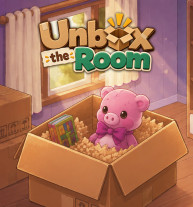
Discover Unbox The Room, a relaxing browser puzzle game where you unpack boxes, organize everyday belongings, decorate rooms, and solve satisfying spatial challenges.
Unbox The Room is a relaxing puzzle and organization simulation game designed for players who enjoy sorting, arranging, and discovering new objects. Instead of demanding quick reflexes or intense action, the game focuses on thoughtful decisions as you unpack belongings and find the right place for everything.
Each room becomes a small spatial puzzle. You take items from boxes one at a time, identify them, and decide whether they belong on a shelf, inside a drawer, on a table, or somewhere else. The pixel-art presentation adds a charming visual style, while interactive objects provide extra details to discover.
For casual gamers and young gaming enthusiasts, Unbox The Room offers an easygoing experience that combines puzzle-solving, organization, decoration, and exploration.
The appeal of Unbox The Room comes from its simple mechanics and satisfying progression. Key features include:
The core gameplay loop is straightforward: unpack, identify, arrange, and explore. Begin by removing belongings from the available boxes. You may discover books, decorations, personal items, and other everyday objects.
Before placing something, look around the room and consider its most logical location. Some items naturally fit on shelves or tables, while others may need to be stored in drawers or specific spaces. As the room fills up, managing available space becomes an important part of the puzzle.
Certain objects also have interactive details. For example, a cassette tape can be personalized by typing a name onto its label, adding a small creative element to the organizing experience.
On PC, use the left mouse button to select, pick up, place, and interact with objects, while dragging lets you move belongings around the room. On mobile devices, tap to interact and drag items into position.
For a smoother experience:
there are many other games developed under Wordle Online, let's try them out